Plan the day
Give every visit a clear place.
Use scheduling and dispatch views to see the work ahead, the assigned technician, and the customer context. When a call changes the day, your office has one place to start.
Built around a real service day
From the first call to the next maintenance visit, keep your customers, equipment, crew, and paperwork connected in IKOK.
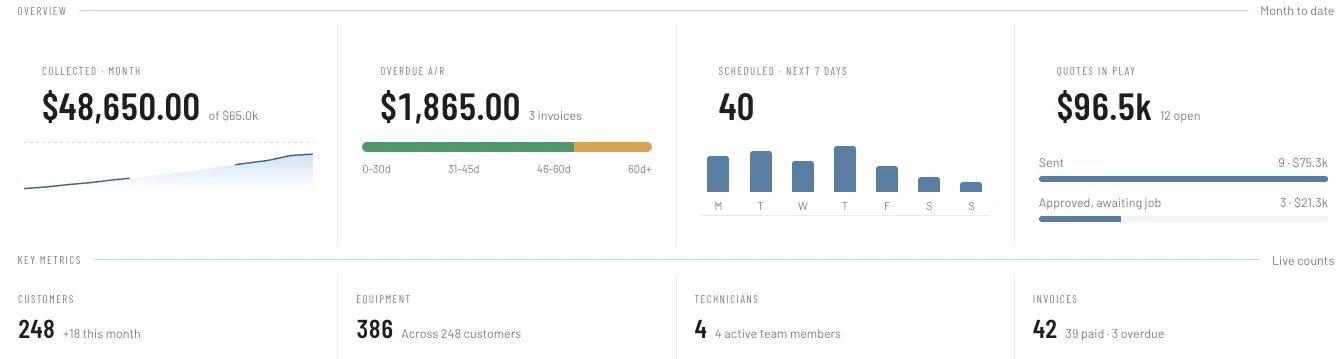
Less hunting. More context.
A disconnected record can turn a simple visit into a chain of calls. Keep the information for the next step close to the work.
Plan the day
Use scheduling and dispatch views to see the work ahead, the assigned technician, and the customer context. When a call changes the day, your office has one place to start.
Know the system
Keep equipment records and prior work connected to the customer. Model information, service notes, and job history help the next visit begin with useful context.
Present the options
Save reusable quote and option templates, then build a custom Good / Better / Best proposal with equipment photos, pricing, benefits, specifications, installation notes, and warranty details.
See a populated exampleFollow the money
Manage invoices and payments alongside the customer and job records. Review what has been invoiced, what has been paid, and what still needs the office’s attention.
Keep the relationship
Define customer benefits and technician tasks, then track customer programs, upcoming visits, renewals, and authorized recurring payments. Set the billing and service frequencies independently.
See a populated exampleSee the business
Review driving time, time on site, jobs, and revenue. Prepare weekly or monthly work reports and recorded commission statements to support contractor payment review; reports do not execute payouts.
Explore technician reportingMake it your own
Build branded templates in Email Studio with reusable blocks and supported personalization variables. Review desktop and mobile layouts, send a test, and publish your template.
See a populated exampleFrom the site visit to a clear choice
Build from a reusable quote or option template, then tailor the equipment, installation scope, benefits, price, and warranty details to this customer’s job. Review the customer presentation before sending.
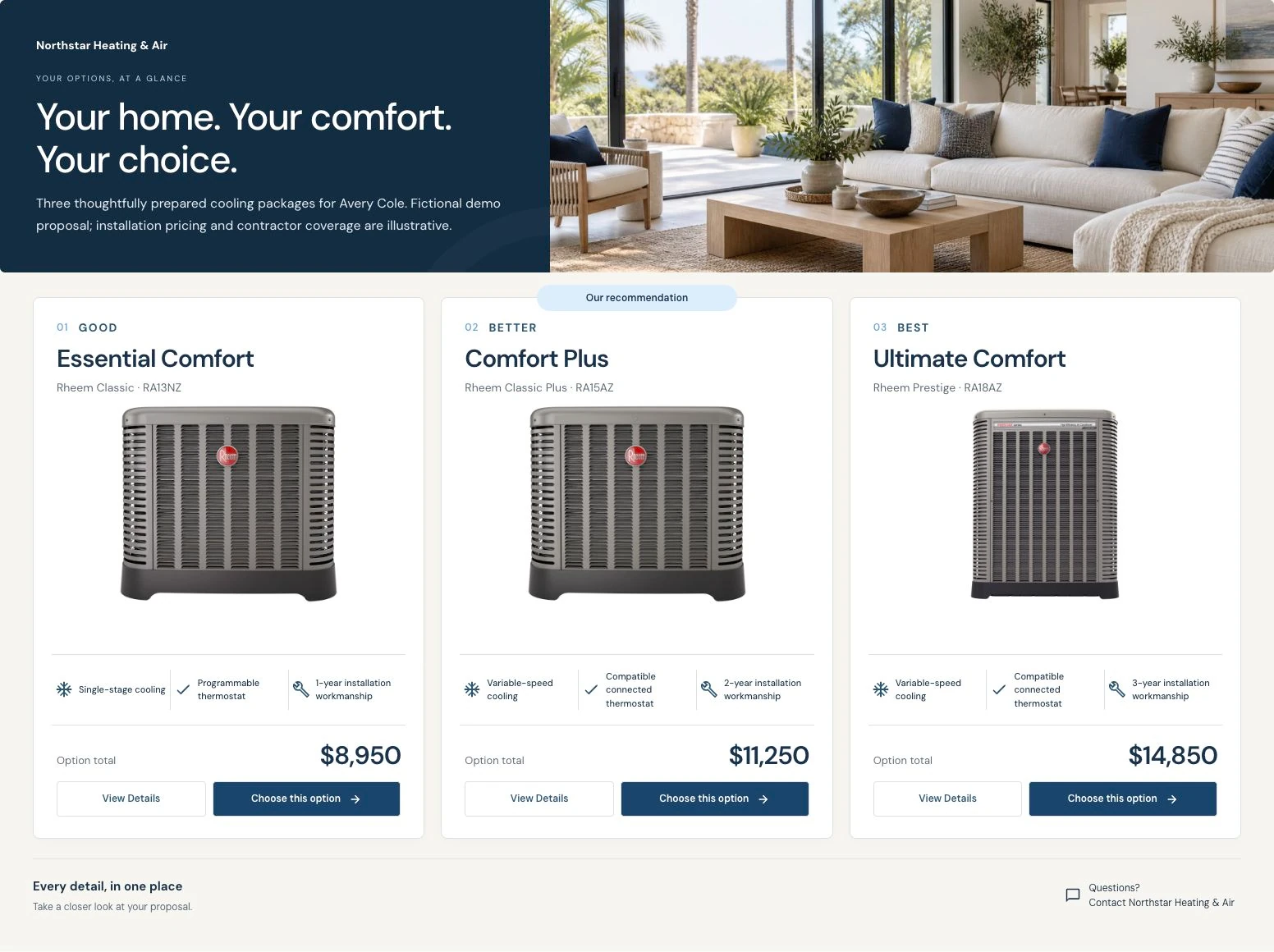
These fictional planning examples show how one, two, or three options can fit different conversations. Confirm the equipment and scope for the actual property before making an offer.
Keep useful descriptions and option templates, then check the customer, property, quantities, prices, and terms for each proposal. Preview the customer view so the choice is understandable before you send it.
Plan the estimate follow-upUseful to the people doing the work
A useful HVAC workspace should make the next decision easier for both.
Review scheduled work and field activity, open the customer or job record, and follow through on quotes and invoices.
Work from the customer, address, equipment, and job details available to the technician’s role. Confirm device access and field permissions during your walkthrough.
Use reports to look at completed work, recorded time, and revenue. Review the source records and the chosen period before drawing conclusions.
Choose with confidence
A feature list only tells part of the story. Ask us to walk through a rescheduled call, a returning customer with multiple systems, and a proposal with more than one option. You should be able to follow the work as clearly as the sales presentation.
Use our HVAC CRM evaluation checklistHVAC software, explained
An HVAC CRM connects customer information with the work performed for that customer. In IKOK, that includes scheduling, equipment and service history, quotes, invoices, maintenance programs, and reporting. The practical goal is to give office staff and technicians useful context as a job moves through the business.
Yes. IKOK supports regular quotes and Good / Better / Best offerings with images, descriptions, features, and prices. The offering presentation adapts to one, two, or three options, so a customer can review the proposal in a layout suited to the work being offered.
Job arrival and status notifications currently use email when configured. SMS arrival updates are planned. Ask to see the active notification settings during a product walkthrough so your team knows exactly which messages are available.
The HVAC365 program is for HVAC businesses new to IKOK, operating for at least two years, with three to five daily active users. Approved businesses receive 3 months up to 1 year of free membership. IKOK determines the grant length after reviewing the application, from 3 months up to 365 days, and confirms the approved term before enrollment. Applying does not activate membership; eligibility and terms apply. After a 30-day onboarding period: keep a verified payout bank account connected, have at least 2 weekly active team members, and record at least 10 completed customer payments each month. Participation and review terms apply.
For established HVAC teams new to IKOK
Apply for 3 months up to 1 year of free IKOK membership. IKOK determines the grant length after application review and confirms your approved term before enrollment. For HVAC businesses new to IKOK, operating for at least two years, with 3–5 daily active users. Eligibility and terms apply. After a 30-day onboarding period: keep a verified payout bank account connected, have at least 2 weekly active team members, and record at least 10 completed customer payments each month. Participation and review terms apply.
Your privacy choices
Essential storage keeps this website working and remembers your choice. Optional analytics helps us understand which articles are useful. It stays off unless you allow it. Read our cookie policy.
Your browser’s privacy signal is on. Optional analytics will stay off.