Start with commitments, not a full calendar
Busy-season preparation is the work of deciding what your team can responsibly promise before the phones get busy. The calendar needs credible working hours and visit durations. The office needs a way to distinguish confirmed visits, work awaiting assignment, and requests that still lack the information required to book them.
Use a fictional business, Cedar HVAC, to make the planning concrete. Cedar has two technicians, scheduled maintenance visits, and a variable number of service requests. One technician also handles a particular class of equipment. The aim is not to hit an invented utilization target; it is to avoid selling the same practical time twice.
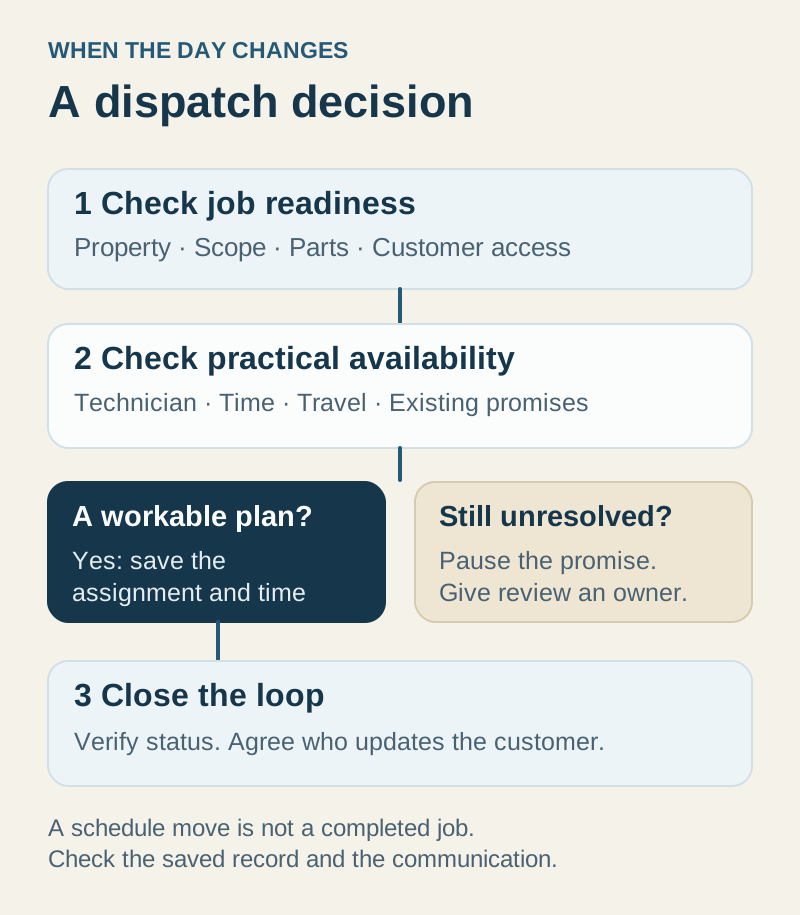
Start by reviewing the next week’s existing commitments. Identify visits tied to customer agreements, work waiting on parts, and return appointments that require a specific technician. A request to move a visit is a decision that someone must make and communicate, not just a card that can be dragged elsewhere.
Make available hours believable
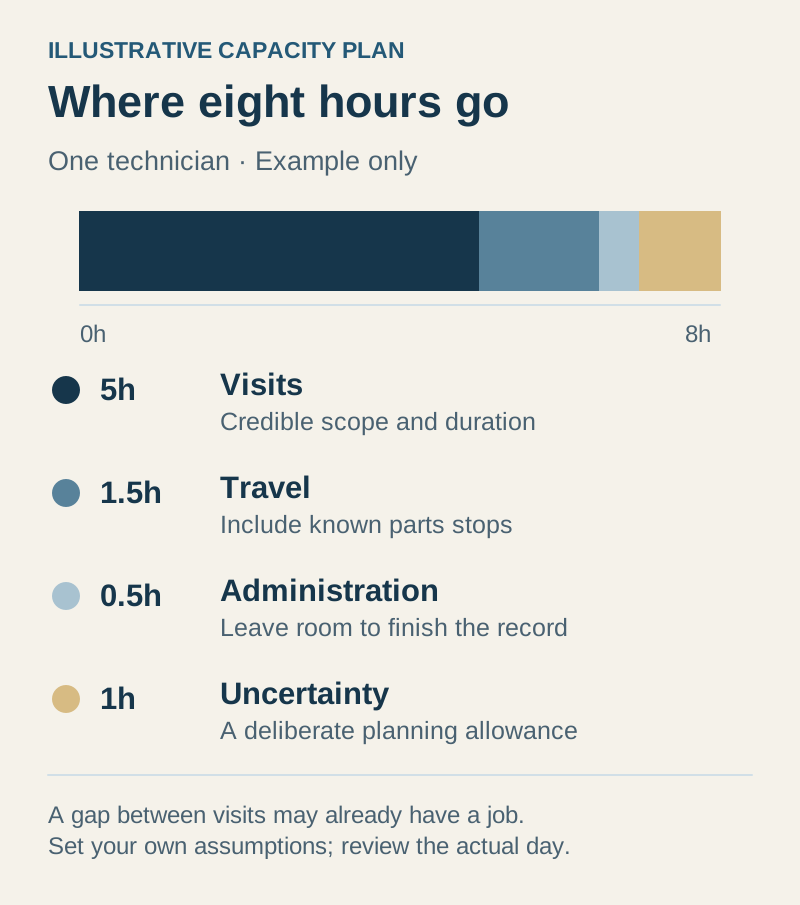
Take one illustrative eight-hour technician day. Cedar plans five hours of customer visits, ninety minutes of travel, thirty minutes of administration, and one hour of uncertainty. These are planning assumptions for this example, not industry benchmarks or measured IKOK results. Your territory and work types may require a different allocation.
| Part of the example day | Planned time | What to check |
|---|---|---|
| Customer appointments | 5 hours | Scope and duration are plausible for the assigned technician |
| Travel and collection | 1.5 hours | Locations and known parts stops support the plan |
| Administration | 0.5 hour | Work records and customer follow-up have somewhere to fit |
| Uncertainty | 1 hour | The office knows who may use this remaining room and why |
The arithmetic is simple: those activities already use eight hours. A visible gap between appointment cards may be travel time, not a promise you can make to another customer. Decide how your office will account for these commitments and review the assumptions against the actual day.
Review IKOK’s Capacity view with its limits in mind
In Schedule → Capacity, IKOK compares assigned job durations with configured working hours and working days. It shows a week of technician load and separately identifies unassigned work. This is useful for spotting a heavily booked day and asking whether another technician has a workable alternative.
The result depends on the data you put in. Check staff working days and hours. Correct default or stale appointment durations before using the display to make promises. Review overlapping jobs directly; a total of booked minutes does not resolve scheduling conflicts.
Capacity is not a weather-driven demand forecast, automatic staffing recommendation, or guarantee that the displayed open time includes travel and breaks. Use the Map view for location context and the Dispatch board for assignment decisions. Keep the final judgment with the person who understands the job, technician, territory, and customer commitment.
Protect maintenance commitments without confusing billing
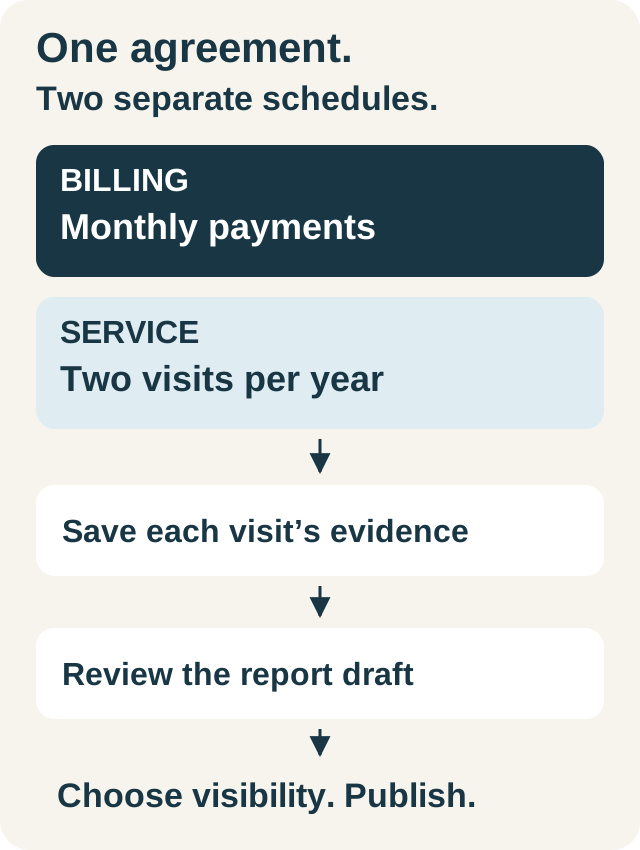
Review the work already promised through maintenance agreements. Identify the relevant customer, property, equipment, visit requirements, and service cadence. Do not assume that a monthly payment means a monthly visit, or that an annual payment defines a single service event.
IKOK’s maintenance package configuration separates service frequency from billing frequency and includes contract duration and renewal and cancellation terms. Accepted package terms are preserved for the customer’s agreement. When planning a season, use the actual accepted commitment rather than the wording of a package you edited later.
Confirm the maintenance module and equipment features available in your plan and roles. The maintenance agreement guide explains the operating workflow in more detail. Before a peak period, the practical goal is a reviewable list of owed visits and unresolved scheduling decisions—not a new agreement created merely to make the calendar look organized.
Agree how incoming requests become appointments
Create a short intake checklist for the office: customer, service address, reported issue, contact method, access constraints, and information needed to choose an appropriate technician. This is an operational intake process, not remote diagnosis. Staff should use the business’s established escalation process for situations beyond routine scheduling.
Give each request a clear next step: ready to assign, waiting for information, waiting for parts, or requiring a manager’s decision. These are suggested working categories; configure or track them through the workflow your team has agreed rather than assuming they are built-in statuses with automatic behavior.
Review unassigned jobs alongside assigned capacity. In IKOK, unassigned work stays visible without being counted as a particular technician’s booked stop. The office should decide who reviews it and when, so a quiet-looking technician row does not hide an unresolved request.
Prepare communication before the pressure arrives
Test the ordinary messages you will need: appointment confirmation, a revised arrival plan, a parts delay, and a request for missing access information. Keep wording useful and specific. A reusable email or message should still be reviewed against the actual customer and commitment.
Where IKOK SMS is enabled and the sender is ready, office staff and authorized technicians can contribute to the same customer conversation. Decide who owns the reply and when a private internal note is appropriate. Paid access, staff permissions, and carrier/provider readiness should be checked before the first busy day, not inferred from an account being created.
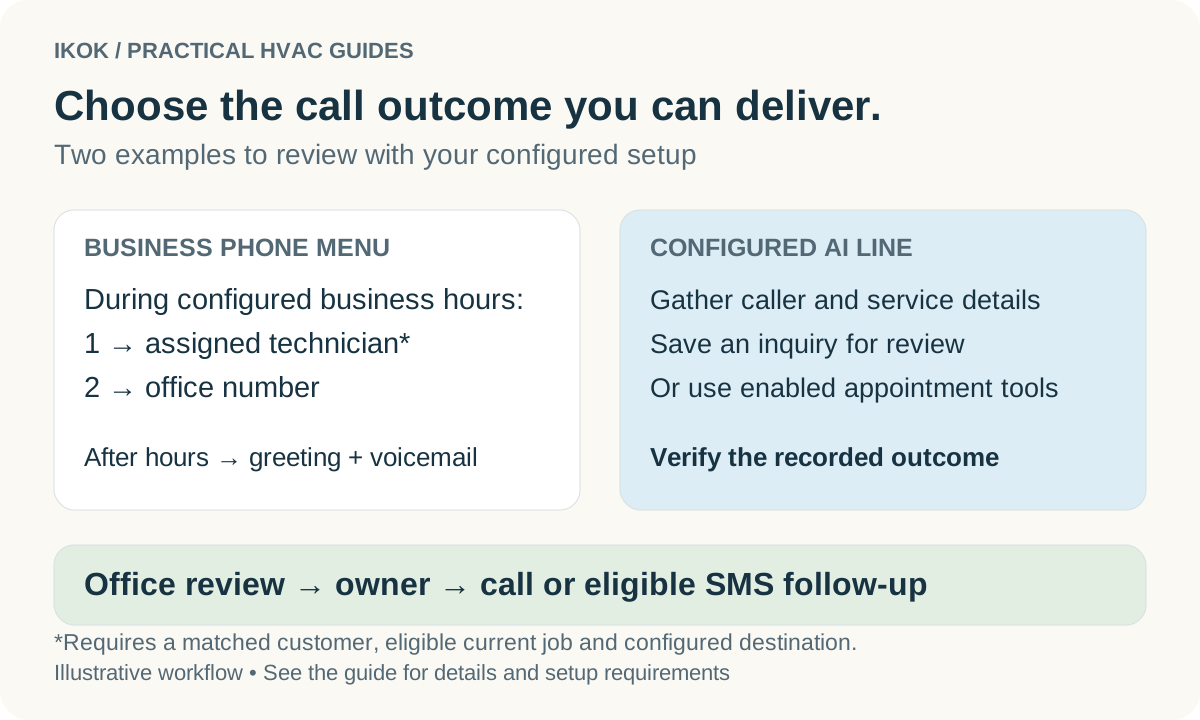
If phone handling or an AI receptionist is part of your plan, test the exact handoff and after-hours behavior with approved test calls. Confirm what it records, what action it can take, and how a human sees unfinished work. A call being answered should not be treated as proof of a confirmed appointment.
Use a daily review to keep the plan honest
At the start of the day, review changed appointments, parts constraints, working hours, and unassigned requests. During the day, inspect a developing delay before it affects the next commitment. Before closing, identify work that was completed, work that still needs a customer decision, and tomorrow’s unresolved constraints.
For Cedar, that review reveals a maintenance visit that can stay as promised and a new request that needs a different date. The office can explain both decisions from the records. That is a useful busy-season outcome: the team knows what it can do, customers receive a clear commitment, and unfinished work retains an owner.
Bring a sample week to an IKOK planning walkthrough. Ask to review working hours, assigned and unassigned work, and the customer update for one changed appointment.
A few practical questions
Before you put it to work
How does IKOK show technician capacity?
The Capacity view compares the duration of assigned jobs with configured working hours and working days, and shows unassigned load separately. It is a planning indicator; travel, breaks, parts collection, and overlapping appointments still need review.
Should maintenance billing frequency determine visit frequency?
No. Billing and service cadence are separate parts of a maintenance agreement. Plan the visits from the customer’s accepted service commitment and review the agreed billing schedule separately.