What three-way communication should mean for an HVAC team
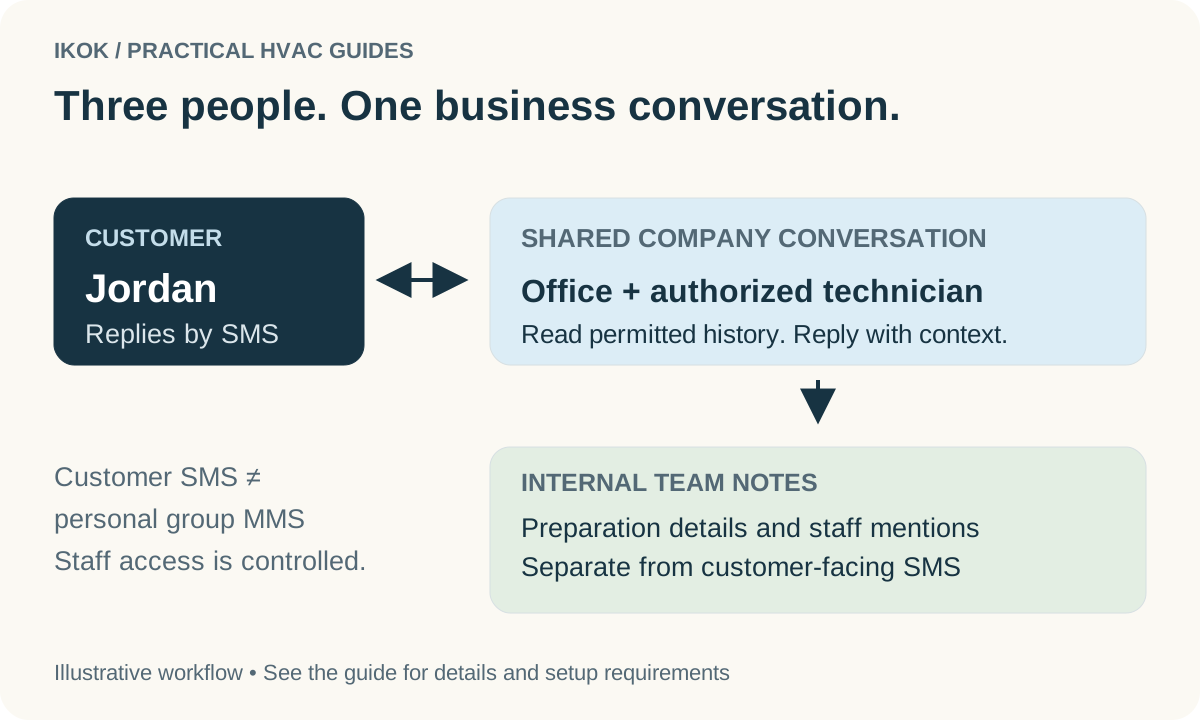
The homeowner should not need to repeat the same question to the office and the technician. In IKOK, the office and authorized technicians can contribute to the same company-to-customer SMS conversation. Staff see the history their permissions allow and can continue the discussion from the business workspace.
That provides an office–technician–customer workflow. It is not a claim that IKOK creates a carrier group-MMS chat with three personal phone numbers. The distinction matters: the customer communicates with the business, while staff collaborate through controlled access and separate internal notes.
Follow one real interface example
The screenshot below is the IKOK Messages interface populated with fictional demonstration records. Jordan is the customer, Maya is the dispatcher and Devon is the technician. The visible conversation illustrates an A/C visit and an extra question about a thermostat.
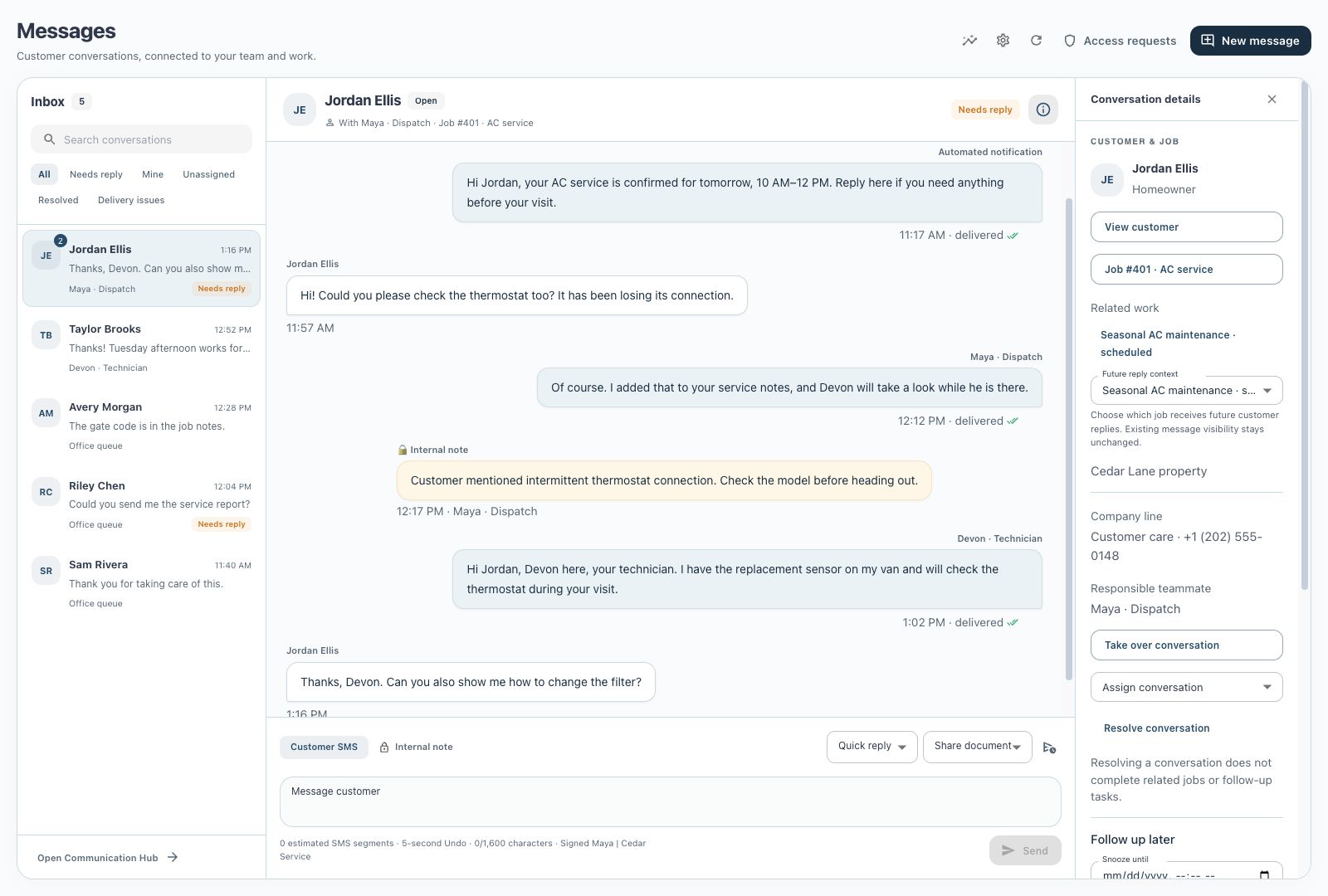
Jordan asks whether the technician can also check the thermostat. Maya acknowledges the request and adds the service context. She records an internal note for the team. Devon reviews the permitted conversation and replies to Jordan as the technician. The question and response remain connected instead of being scattered across personal phones.
This is a communication example, not a technical recommendation about thermostat repairs. Staff still need to confirm the actual scope and equipment before promising work.
Decide what belongs in each channel
| Information | Customer SMS | Internal note |
|---|---|---|
| Agreed arrival window | Yes, once confirmed | Optional scheduling context |
| Customer's question | Acknowledge and answer appropriately | Add staff context if needed |
| Technician preparation detail | Only what helps the customer | Staff-only detail belongs here |
| Unverified diagnosis or blame | Do not present as fact | Record observations neutrally for review |
| Published invoice or report link | Share the authorized document | Discuss review needs internally first |
The composer distinguishes Customer SMS from Internal note. Make that choice before entering sensitive staff context. Internal mentions help direct staff attention; they do not convert an internal note into a customer message. Permissions and customer-number privacy rules still apply.
Give the conversation an owner
A shared inbox needs responsibility as well as visibility. Use assignment or handoff so the office knows who owes the next response. Before taking over, read the most recent customer message and staff reply. If the technician is driving or working, the office can handle an appropriate response instead of requiring the homeowner to wait for a personal callback.
The inbox supports working views such as needs reply and unassigned, plus conversation actions including resolve and snooze. Use snooze only with a clear future action. Resolve when the communication task is finished; it does not automatically complete the related job or any promised follow-up.
A customer may have more than one job. Review the customer and job context before sharing a document or answering an appointment question. Changing the context for future replies is not permission to expose unrelated past messages.
Customize the messages you repeat
Create quick replies for useful, repeatable situations: an arrival-window clarification, a request for a callback time, or a short introduction to a published service report. Use company signatures to keep the sender recognizable. Replace the variable details with the correct current information before sending.
For example: “Hi Jordan, Maya from Cedar Service here. Devon has your thermostat question in the visit notes. If the issue changes before the appointment, reply here so our team can review it.” The wording is fictional and should only be used when those statements are true.
IKOK also supports sharing authorized quote, invoice and published report links. A report draft with internal notes should go through review and publication before it becomes a customer-facing link.
Know the sending controls
Authorized managers can schedule a future message and cancel it while the cancellation action remains available. A five-second Undo window applies before the message is released for sending; it cannot retract an SMS already delivered to the customer's phone. Delivery status is not a read receipt.
Sending requires an activated SMS sender and the appropriate consent, permissions and service entitlement. Supported automations have their own settings. Pausing automation, sending a manual message and resolving a conversation are different actions, so teach the team which one addresses the current situation.
Run a handoff test in your demo
Request a shared-inbox demonstration with an office role and a technician role. Ask the office to receive a question, add an internal note, assign the conversation, and let the technician reply. Then inspect what each role and the customer can see. Finish by sharing a demonstration report and reviewing a scheduled message. This tests the collaboration your team needs, rather than just whether the software can send a text.