A roofing CRM should make one job record understandable to the office and the field team. For a small roofing contractor, the useful test is not the length of a feature list. It is whether the team can follow a homeowner inquiry from the first contact through the site visit, proposal, scheduled work and invoice without retyping the facts that decide the next step.
This guide uses a fictional company, Ridgeway Roofing, to build a practical demo test. It does not assume that a general service CRM performs roof measurements, aerial estimating, takeoffs, material ordering, permit filing or manufacturer warranty submissions. Those are specialist requirements to verify separately.
Start with one real buyer decision
Ridgeway Roofing has three roles:
- Maya, the office coordinator, receives inquiries and keeps appointments clear.
- Luis, the field lead, visits the property, records what he observed and prepares the team for the next decision.
- Erin, the owner, reviews the proposal, scheduling commitment and final billing record.
They are comparing CRM software because notes, photos and approval details currently live in separate places. Their test case is a homeowner who reports a leak near a rear addition. During the visit, Luis finds that access to one roof section is blocked and a second visit is needed. That exception matters: a system can look organized during a perfect demo while still losing the reason a job is waiting.
The team wants a shared record that answers four questions: Which property is involved? What did the field team observe? What has the customer approved? What must happen next?
Define the record before watching a demo
Ask the vendor to use one sample customer and one property through the entire demonstration. At minimum, the record should keep these facts easy to find:
| Decision point | Information the team needs | Person who confirms it |
|---|---|---|
| Intake | Customer, service address, callback details and reported problem | Maya |
| Site visit | Appointment, assigned person, access notes and field observations | Luis |
| Proposal | Clearly described scope, options, exclusions and approval status | Luis and Erin |
| Scheduling | Agreed next visit, assignment and any unresolved prerequisite | Maya |
| Billing | Approved scope, invoice status, recorded payments and remaining balance | Erin |
Leave fields unresolved when the source record does not answer them. A blank roof measurement is not zero, and a missing approval is not permission to schedule work.
Test the customer and property handoff
Maya begins by searching for the customer before creating anything new. The demo should show whether she can distinguish people with similar names and confirm the correct service address. If the same customer owns more than one property, the visit and proposal need to remain attached to the intended location.
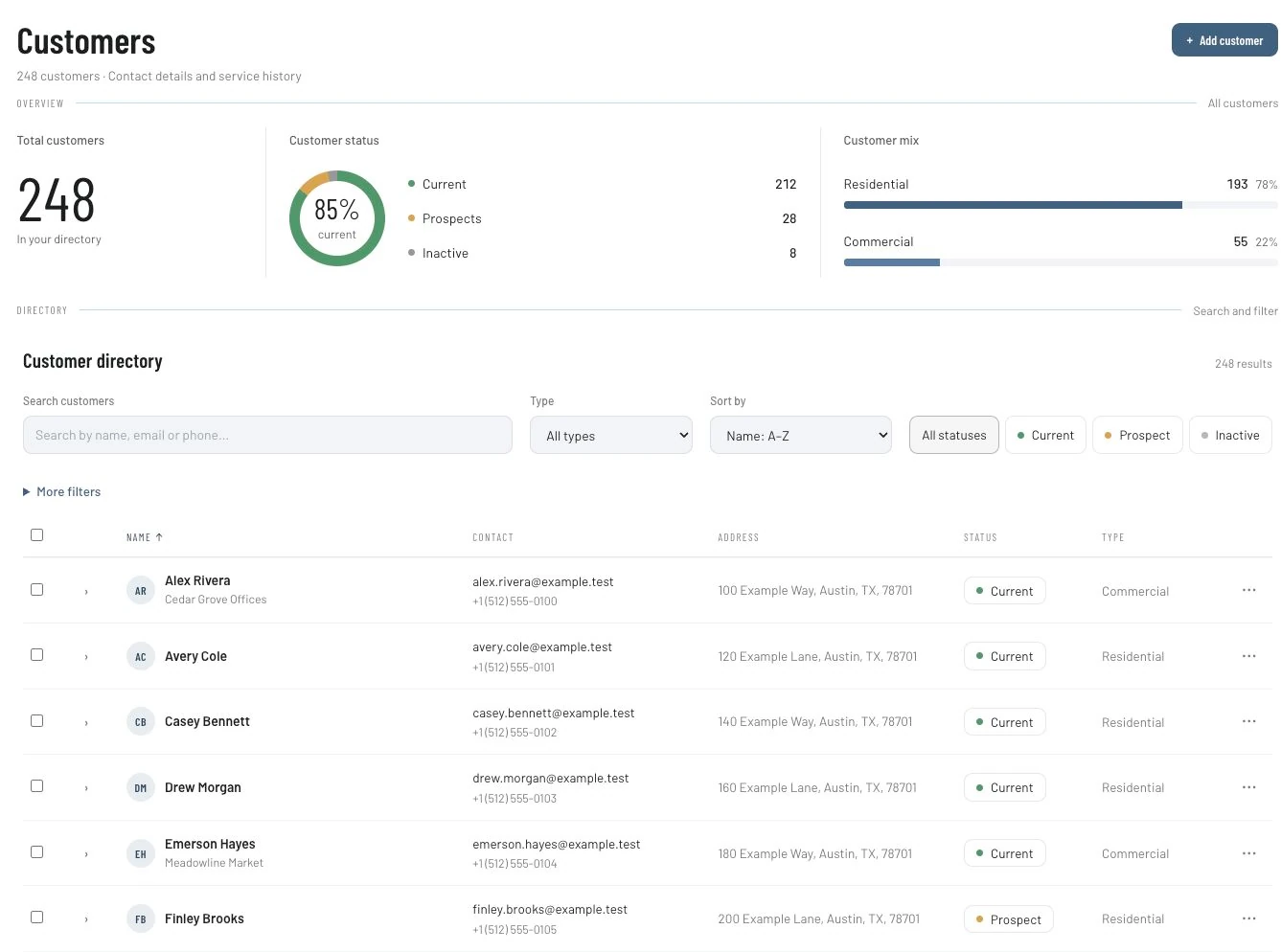
Current IKOK customer view with safe fictional HVAC demo data. It illustrates customer search and filtering; it does not claim a roofing-specific template.
The buyer should also test what happens when a caller gives incomplete information. Can Maya save a truthful intake note without inventing a roof type, measurement or diagnosis? Can Luis see the original problem statement before the visit? A good handoff preserves the difference between what the customer reported and what the field lead later observed.
Carry observations into a proposal without overstating them
After the site visit, Luis records the accessible observations and the blocked-area exception. The proposal should describe only the scope the team is prepared to offer. If a second inspection is required, the record should say so rather than presenting the unknown area as included.
In the IKOK workflow, proposal details can be organized for customer review and moved forward into later job and invoice steps. During a demo, verify the exact action, the fields that carry forward and what still requires a person to review or edit. Converting a record does not prove that work is complete, that every roofing calculation was performed or that the customer accepted terms that are not recorded.

Current IKOK proposal view with safe fictional demo data. It shows proposal records and statuses, not roofing measurements, takeoffs or aerial estimation.
Erin should ask the vendor to revise one line during the demo. The point is not to manufacture a complicated change order. It is to see whether the latest scope is distinguishable from an earlier draft and whether the next person can tell which version is current.
Run the blocked-access exception
The first visit ends without enough information about the rear section. Ridgeway Roofing should not hide that outcome inside a generic “completed” note.
Use this exception test:
- Luis records what was observed, what was not accessible and what evidence is still needed.
- Maya schedules the follow-up only after the access requirement and responsible contact are clear.
- Erin checks that the proposal does not include unverified work as though it were final.
- The team confirms that the customer, property, original visit and follow-up remain connected.
- Before invoicing, Erin compares the approved scope with the work record and any recorded payment information.
This is where the CRM earns its place. The team should not need a side conversation to explain why a job is waiting or which record controls the next action.
Use a twelve-minute roofing CRM demo worksheet
Bring a copy of this worksheet to every vendor demonstration. Mark each row shown, partly shown, not shown or not applicable. Record the actual screen or saved result rather than accepting a verbal promise.
| Demo action | Evidence to retain | Pass question |
|---|---|---|
| Find the existing customer | Search result and selected property | Did the demo avoid a duplicate record? |
| Create the visit | Saved date, assignment and address | Can the field lead identify the correct property? |
| Add the field exception | Saved observation and unresolved item | Is unknown information still visibly unresolved? |
| Prepare the proposal | Scope, options, exclusions and current status | Can Erin tell what the customer is reviewing? |
| Move to the next job step | Resulting linked record | Did the approved information carry forward accurately? |
| Reschedule the follow-up | Updated appointment and responsibility | Can Maya explain why and what is required? |
| Review the invoice | Invoice status, payments and balance | Does billing match the approved scope? |
| Export or retrieve the record | Actual available output or search result | Can the team find the history later? |
Add a separate row for every roofing-specific requirement. Roof diagrams, measurement reports, supplier price feeds, material ordering, production crews, permits and warranty submissions should remain not verified until the vendor demonstrates the exact function and saved outcome.
Compare the same handoff in every demo
Use the same customer, property and blocked-access scenario in each demonstration. A smaller team may prioritize clear customer, proposal, scheduling and billing records. If your company also needs detailed roof measurements, supplier pricing or production planning, keep those requirements on a separate checklist and ask for a saved example of each one.
Pilot one workflow and measure the misses
Before a full rollout, repeat the worksheet with a few fictional or safely isolated sample jobs. Count only observed outcomes:
- duplicate customer or property records created;
- visits that lack an assigned person or usable access note;
- proposals with unresolved scope presented as final;
- follow-ups whose reason is not visible to the office;
- invoices that cannot be reconciled to the approved scope.
Do not turn a short pilot into a promised savings figure. Its purpose is to expose where the handoff succeeds and where the process, configuration or product evidence is incomplete.
Questions roofing contractors should ask
Does a general CRM replace roofing measurement or estimating software?
Not automatically. Customer, proposal, scheduling and invoice workflows do not prove aerial measurement, takeoff, supplier pricing or specialized estimating. Demonstrate those requirements separately and record what was actually verified.
Should every field note automatically become proposal scope?
No. A field observation, a recommendation and customer-approved scope are different records and decisions. The workflow should keep those distinctions visible and require the appropriate review.
What should we do when an inspection is incomplete?
Record the accessible observations, the missing evidence, the reason it is unavailable and the next responsible person. Keep unknown measurements or scope unresolved rather than entering zero or treating the job as approved.
How can we compare two roofing CRM demos fairly?
Use the same fictional customer, property, exception and worksheet for both. Compare the saved results, permissions and follow-up clarity—not just the vendor's preferred tour.
Ask the demo to prove your handoff
Bring one representative roofing workflow and the worksheet above to an IKOK demo. Ask the team to show the customer, proposal, scheduling and billing steps that are currently available, then list any specialist roofing requirement that still needs separate verification.
Photo: Original IKOK editorial illustration, generated November 25, 2026.