Landscaping business invoicing software should make routine visits and separately approved work easy to distinguish. A customer may have regular lawn service, accept a planting-bed project and move a visit because of rain during the same week. The bill needs a clear basis for each item.
Oak Lane Grounds is a fictional business. Jordan coordinates the office; Sam leads the field crew. A routine visit moves to another day, while the same customer separately accepts a planting-bed refresh. We will follow both without treating every calendar change as a billing change. Product screenshots use separate fictional IKOK demo records, not the company's results.
Start with the customer and the work agreement
Use Customers to find the existing record and confirm the property, contact and invoice recipient. A commercial customer can have an office contact who never attends the property, so the crew still needs usable access information.
Before scheduling, identify the routine service commitment and how the customer is billed. Decide which requests need a separate quote. “Monthly lawn service” and “refresh the front planting bed” represent different scopes even if your crew can perform both during nearby visits.
Quote the extra project explicitly
In Sales → Quotes, prepare a recognizable description of the planting work, quantities, prices, exclusions and terms. Reuse reviewed service wording through a quote template, then adjust it to the actual property. A template is a starting structure, not a verified takeoff or regional cost database.
| Record | Oak Lane's fictional example | Review before billing |
|---|---|---|
| Routine agreement | Existing lawn-care arrangement | Included work and billing basis |
| Extra quote | Planting-bed refresh | Accepted quantities, scope and price |
| Routine visit | Moved because of weather | New date and actual completion |
| Project work | Separate approved job | Work delivered and anything outstanding |
The quote detail provides Convert to Job and Convert to Invoice. For accepted work still to perform, follow the job conversion and check the job type, scheduled date, priority and notes. Do not treat conversion into an invoice as a record of project completion.
Make the weather change in the schedule
Review the affected appointment in Schedule → Dispatch. Check the crew member, time and customer context before moving it. The workspace also has Month, Capacity, Status board, Technician and Map views for reviewing the plan from different angles.
A supported move between technician rows changes the assignment while retaining its time; a move to a time position changes the scheduled time. Resolve reported conflicts and reopen the saved record to check the outcome. None of this establishes automatic route optimization or weather-based rescheduling.
Jordan tells the crew which visit moved and confirms the customer's access. The planting project keeps its own accepted scope. A full calendar is not a reason to combine unrelated billing descriptions.
Turn the crew's closeout into an invoice review
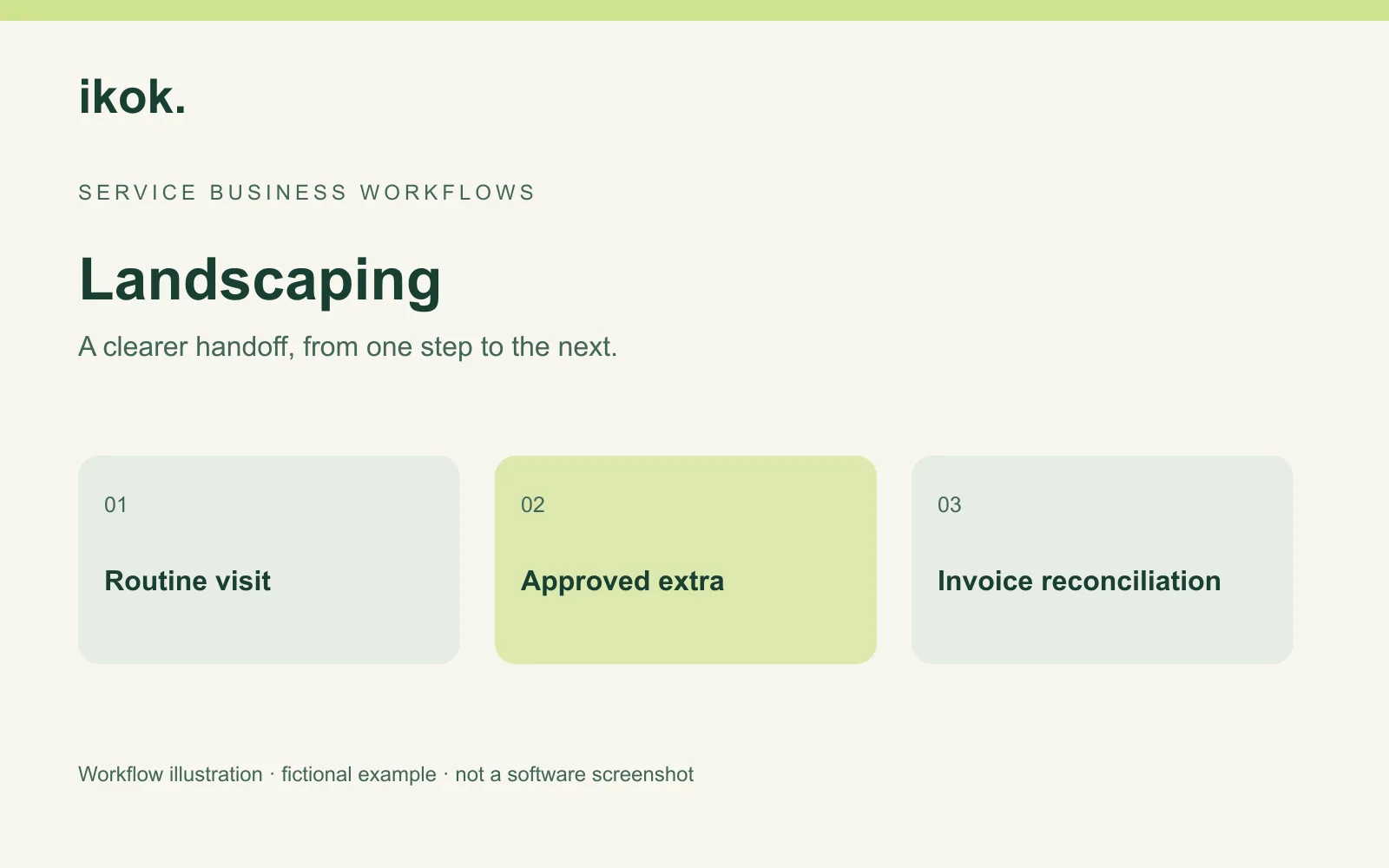
Sam records completed work and anything still waiting on a decision. Jordan uses that record with the quote and agreement to prepare the invoice. The review is easiest when the task description and property remain identifiable.
Routine visit: Record actual completion and the property serviced.
Approved extra: Identify the accepted planting scope and completed items.
Not completed: Record the specific remaining task and who owns the next step.
Office action: Check which agreement or quote governs each charge before sending.
This is a manual handoff template for the business to adapt. It does not promise that IKOK automatically determines billing treatment for a rain delay or partial project.
Review invoice states and recorded payments
The invoice workflow includes balances and payment records. On mobile, the Field invoice list lets an authorized user search by customer or document number and distinguish paid, partial, sent and overdue invoices. Review the actual record before asking a customer to pay an amount that may already have been recorded.
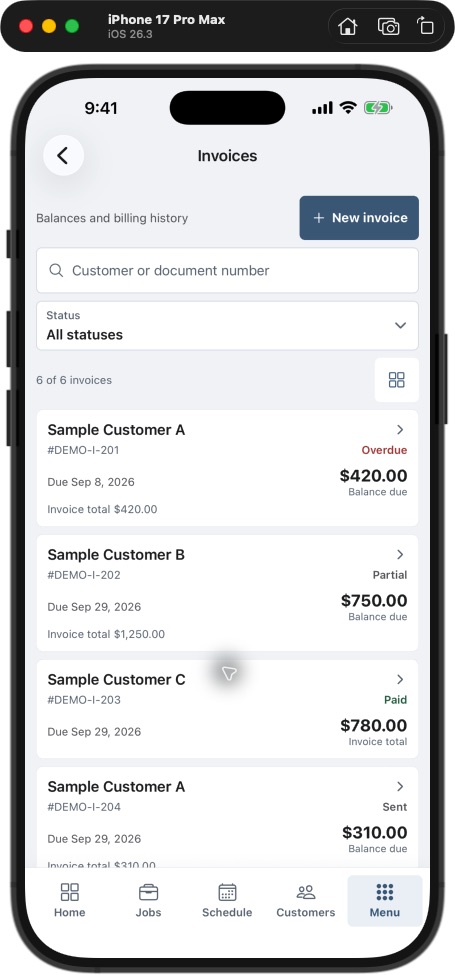
If your office uses QuickBooks integration, agree which records should sync and review the result. Avoid duplicate entry while an earlier sync or payment is still being reconciled.
Use the reports for the question they answer
IKOK's collections report presents recorded collections over time and payment mix. It can prompt a review of the financial records, but it does not by itself show the margin on a particular lawn visit or planting job.
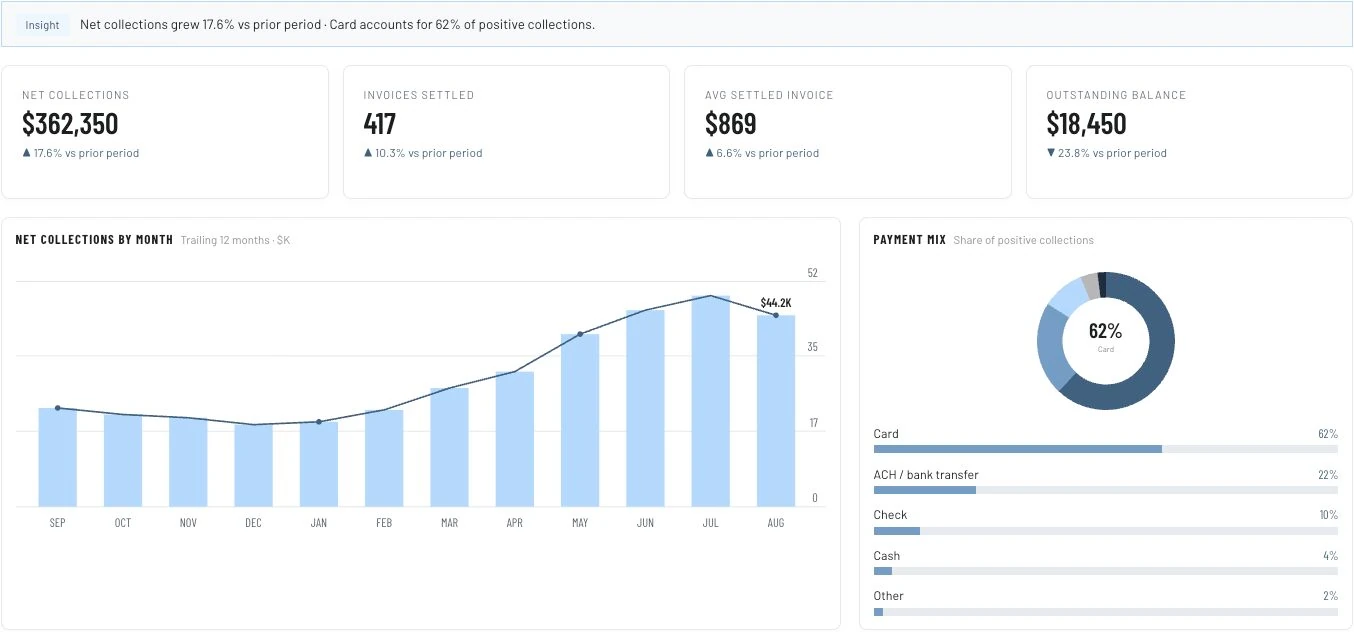
For Oak Lane's pilot, the useful first measures are invoice corrections, missing completion notes and approved extras that have not reached billing review. Separate those operating observations from collections totals. A change in a chart does not prove the new workflow caused it.
Keep reusable service descriptions clear
The service and item catalog can organize entries and categories. Build descriptions around recognizable work, then review the customer's specific quantities and terms before quoting. Keep design work, measurements and specialist production assumptions with the person qualified to make them.
A short service description should answer: where is the work, what outcome is included, what is excluded, and what information must be checked before a price is final? That is more useful than a long list of indistinguishable “landscape service” lines.
Questions landscape businesses ask
Will a moved visit automatically change the invoice?
Do not assume so. Apply the customer's agreement and review actual completion. A calendar change alone does not determine whether a charge is due.
Does the collections report calculate profit per landscape job?
The image here shows collections and payment mix. Establish the inputs and exact report needed for job costs or margin before relying on a different financial interpretation.
Are route optimization and landscape takeoffs included?
Those specialist capabilities are not established by the scheduling and quote workflows in this article. Evaluate them separately if they are essential.
Test routine work and one extra together
Arrange an IKOK walkthrough with an anonymized routine-service agreement and an extra project. Follow the changed visit, approved quote, completed work, invoice and recorded balance without combining their different decisions.
Photo: Original IKOK editorial workflow illustration created for this article; fictional example, not a software screenshot.