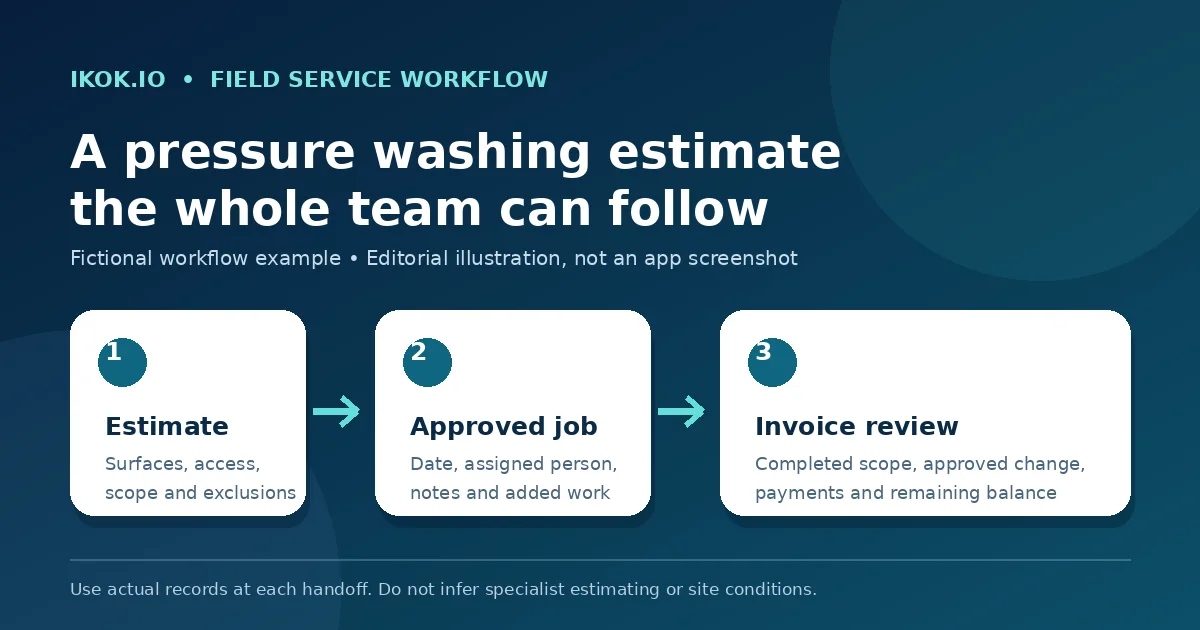
Pressure washing estimating software is most useful when the estimate becomes a clear operating record: which surfaces are included, what the customer must provide, what is excluded, who approved a change, and what the office should invoice after the crew leaves. A polished number alone cannot carry that handoff.
This guide follows BrightLine Exterior Cleaning, a fictional two-person pressure washing company. Mia coordinates customers and billing; Jordan performs the work. A homeowner asks for a driveway and rear patio estimate. The side walkway is discussed later, and exterior water access is not confirmed until the appointment is reviewed. Names, prices and service terms in the scenario are fictional. The product images show separate, reviewed IKOK demo data.
Begin with the customer, property and surfaces
Search Customers before creating a new record. Confirm the customer, service address, billing contact and access instructions. If the same customer owns more than one property, the address must remain visible throughout the estimate and job handoff.
Mia records the request as the customer described it: driveway and rear patio. She does not turn “dark marks near the wall” into a treatment promise or diagnosis. Surface condition, drainage, water access and nearby items still need qualified on-site review.
Use a short intake that distinguishes facts from questions:
- Requested surfaces: driveway and rear patio.
- Property: verified service address.
- Access: gate contact and permitted arrival window.
- Customer-provided resource: whether a usable exterior water connection is confirmed.
- Questions for the site review: surface condition, surrounding property, runoff constraints and anything requiring a separate method or price.
IKOK can organize the customer and work records. This article does not claim that it measures square footage, recognizes surface materials, calculates chemical dilution, checks local runoff rules or prices the job automatically.
Build an estimate the customer can recognize
In Sales → Quotes, create line items that correspond to the work the customer can identify. Review descriptions, quantities, prices, terms and notes before sending. Reusable quote templates can provide reviewed starting language, but the team must still check the actual property and current price.
For BrightLine, the estimate separates the driveway from the rear patio. The side walkway is not quietly included because it appears in a photo or message. Exclusions and customer responsibilities belong where the customer can review them before acceptance.
| Estimate decision | Fictional BrightLine record | Check before sending |
|---|---|---|
| Included areas | Driveway and rear patio | The property and surfaces are unambiguous |
| Separate option | Side walkway | It has its own description and price if offered |
| Access assumption | Exterior water connection available | A responsible person confirms it before the visit |
| Exclusions | Unlisted surfaces and specialist restoration | Wording matches the business's actual service boundary |
| Approval | Customer accepts the reviewed scope | Accepted version and terms are identifiable |
The product view below is an actual customer-facing IKOK proposal populated with fictional HVAC demo content. It is not a pressure washing template. It is included because it shows the verified presentation pattern—clear options, scope, pricing and customer-facing detail—that a pressure washing company should inspect with its own services during a walkthrough.

The IKOK product overview describes branded quotes, reusable templates and online customer links. Use that public evidence as a starting point, then ask to see your own estimate structure in a live walkthrough.
Convert accepted scope into work to perform
The quote detail includes Convert to Job and Convert to Invoice actions. They represent different decisions. When accepted work still needs to be performed, use the job path and review the job type, date, priority and notes in the conversion dialog. Then confirm the saved assignment in Schedule → Dispatch.
Converting a quote does not prove that access is ready or the work is complete. Mia reviews the appointment and makes sure Jordan can see the property, agreed surfaces and unresolved water-access question. A schedule move also does not complete the work; reopen the saved record and check the assignment and time.
The existing small-crew workflow guide gives a detailed example of the quote-to-job handoff using an HVAC scenario. The business records are relevant across field service, while the technical work remains trade-specific.
Handle the side walkway as a real change
On arrival, the homeowner asks Jordan to include the side walkway. BrightLine treats this as a separate scope decision. Jordan records the request and follows the company's approval process before treating the walkway as authorized work. The article does not claim that IKOK automatically validates a change order or determines a legally sufficient approval.
The team should be able to answer four questions from the record:
- What did the accepted estimate include?
- What additional work was requested?
- Who approved the change under the company's process?
- What was actually completed?
If the walkway is not approved, it stays outside the completed scope. If weather, access or site conditions stop part of the work, the closeout should state exactly what remains rather than marking the entire job complete by habit.
Reuse this estimate-to-closeout handoff
Jordan uses the following manual note structure after the visit. A pressure washing team can adapt it to its own policies and required site records:
Property and visit: Service address, date and responsible crew member.
Accepted surfaces: Copy the identifiable surfaces from the accepted estimate.
Added work: Describe the request, approval record and agreed price or next decision.
Completed work: Record only what the crew actually completed.
Site exception: Note access, weather, damage concern or unfinished area without inventing a diagnosis.
Customer communication: Record the actual handoff and any promised follow-up.
Office action: Prepare the invoice, schedule a return or request a decision—name one owner.
This aid is a working note, not an automatic IKOK feature. The team populates it from actual records. It does not replace photographs, safety documentation, environmental requirements, contracts or other records the business may need.
Review the invoice against completed work
After the job, compare invoice lines with the accepted estimate, approved change and closeout note. Review any payment already recorded and the remaining balance. The invoice detail supports payment records and balances; the Field invoice list distinguishes paid, partial, sent and overdue examples.
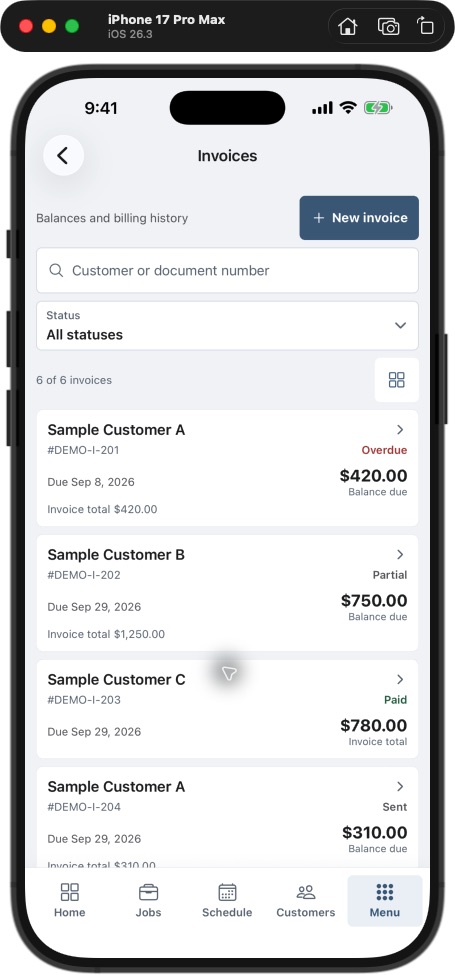
A partially paid invoice is not a partially completed job. Keep work status and payment status separate. If accounting is connected, review the configured QuickBooks integration and the relevant sync result before duplicating a payment or assuming a record transferred.
Run a five-estimate pilot
Choose five recent estimates with different surfaces or access conditions. For each one, record whether the property, included areas, exclusions, customer responsibilities and approval were clear before the appointment. After service, check whether any added work had a traceable decision and whether the invoice matched completion.
| Pilot question | Record the actual observation | If unclear |
|---|---|---|
| Could the crew identify every included surface? | Yes, no or specific missing detail | Correct the estimate and job handoff |
| Was access ready before dispatch? | Confirmed or unresolved | Name the person responsible for confirmation |
| Did added work have an approval record? | Record reference or missing decision | Resolve before billing the addition |
| Did closeout distinguish complete and open work? | Actual note quality | Ask for a factual correction |
| Did invoice lines match the record? | Match or correction needed | Reconcile before sending |
Count missing-information requests and invoice corrections only from your real pilot. Do not assign a promised savings percentage or treat a fictional screenshot as evidence of an operating result.
Questions pressure washing owners ask
Does IKOK calculate pressure washing square footage or chemical use?
Those specialist estimating functions are not established by the product evidence used for this article. The verified workflow covers customer records, quotes, jobs, scheduling, invoices and payments. Evaluate measurement, chemical, compliance and production requirements separately.
Can I reuse an estimate template?
IKOK supports reusable quote templates. Treat the template as reviewed starting language. Check surfaces, quantities, prices, exclusions, access and terms for every property before sending.
Does accepting a quote automatically mean the property is ready?
No. Acceptance establishes a business decision about the presented scope. Your team still needs to confirm practical readiness such as access, resources, date, assignment and any site-specific requirements.
Can the crew add work from the field?
The workflow can keep the request and resulting records connected, but your business must define who can price and approve a change, what evidence is required and when the invoice may include it. Confirm roles and permissions during a demonstration.
Bring one real estimate to the walkthrough
Use the field-service CRM evaluation checklist to test the full path, recognizing that the public checklist uses HVAC examples. Then book an IKOK walkthrough with an anonymized pressure washing estimate containing two surfaces, one access question and one possible add-on. Ask the team to follow the exact saved version from customer record to accepted quote, scheduled job, closeout and invoice.
Photo: Original IKOK editorial workflow illustration created for this article; fictional example, not a software screenshot.